

Knowledge Base Testing
Quickly spot check your knowledge bases for coverage
The Knowledge Base Tester lets you validate what information is — and isn't — covered by a specific knowledge base, in isolation from your agents and their prompts. Use it for quick, one-shot spot checks before or after you update a knowledge base's content.
When to Use This Tool
| Use Case | Recommended Tool |
|---|---|
| Test a single knowledge base in isolation | Knowledge Base Tester (this doc) |
| Test how an agent responds end-to-end | Agent Builder test interface |
| Run bulk/regression tests across all knowledge bases an agent has access to | Simulations interface |
The Knowledge Base Tester is purely a content diagnostic. It is not influenced by agent prompting — it shows you what raw chunks would be returned to the agent for a given the user query and whether they cover a given question.
How to Access
- Navigate to the AI Agents > Knowledge Bases section in your Regal account.
- Open the knowledge base you want to test.
- Click the Test button on the knowledge base page.
Each knowledge base can have multiple sources. The test runs across all sources in that knowledge base.
Running a Test
Enter any question into the test interface and click Search. The tool returns:
- Chunks — the actual text segments that would be retrieved and passed to your agent.
- Match scores — how closely each chunk matches the question.
- Coverage summary — a synthesized judgment of how well the knowledge base covers the question.
Coverage Levels
| Coverage | What It Means |
|---|---|
| Well covered | The knowledge base contains clear, relevant information. The agent will have a solid basis for a full response. |
| Partially covered | Some relevant information exists, but it's incomplete. The agent can give a partial answer but not a comprehensive one. |
| Not covered | No relevant information exists. Chunks are still returned (closest matches), but match scores will be low and the agent won't have a reliable basis to answer. |
Even for "not covered" questions, the retrieval system always returns some chunks — whatever is the closest match. Low match scores alongside a "not covered" summary are the signal that the content genuinely isn't there.
Give Time for Your Knowledge Base to Fully UploadWhen you first upload a knowledge base or change to your knowledge base, it may time some time before your knowledge base is fully up to date. Just because it's saved, doesn't mean our RAG pipeline has fully finished processing. If you try to test your knowledge base immediately after updating it, the tester can tell you if your change has been persisted or not.
Interpreting Results
This is an example knowledge base about Pets and Pet Insurance:
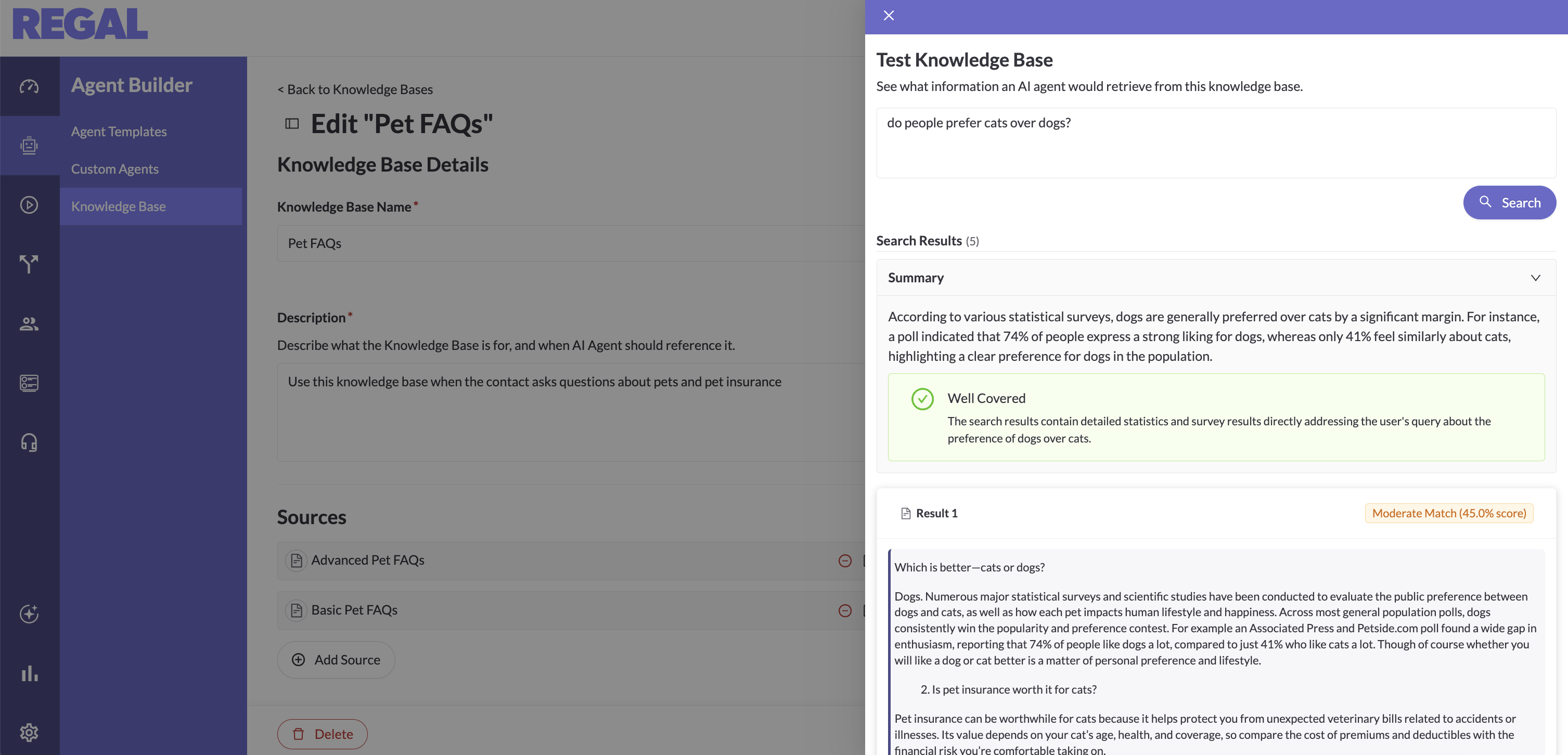
Here are the results the Knowledge Base Tester returned for some sample queries:
Well covered example: "Do most people prefer dogs over cats?"
The knowledge base returns a high-confidence chunk summarizing a survey: 74% of people prefer dogs. The agent has everything it needs.
Partially covered example: "What are all the things covered by pet insurance?"
The knowledge base has some FAQs on pet insurance coverage, but they aren't comprehensive. The agent can give a general answer but can't enumerate everything. This is a signal to consider expanding the knowledge base content.
Not covered example: "What does auto insurance usually cover?"
The knowledge base has no relevant content. Returned chunks have low match scores. The summary confirms the topic is not covered at all — meaning the agent would not have a reliable basis to respond on this topic from this knowledge base.
What This Tool Does Not Do
- It does not simulate agent behavior or apply agent prompting. How an agent vocalizes a response depends on its prompt configuration, which is separate from what's retrieved.
- It does not test across multiple knowledge bases simultaneously. If your agent has access to several knowledge bases, use the Agent Builder or Simulations interface to test the full stack.
- It does not replace bulk regression testing. Once you're confident in your knowledge base content, use Simulations to test realistic conversation flows.
Recommended Knowledge Base Testing Workflow
- Spot-check early — use the Knowledge Base Tester when you first populate or update a knowledge base to confirm key topics are well covered.
- Identify gaps — ask questions your customers commonly ask and see whether coverage is well, partial, or not covered. Add content for gaps.
- Graduate to simulations — once the knowledge base looks solid in isolation, run simulations from the agent level to validate end-to-end behavior across all knowledge bases and with prompting applied.
▶️ VIDEO TUTORIAL
Updated 3 months ago