

AI Call Dispositions
Accurately disposition AI Agent calls
Overview
Your AI voice agent assigns one of two types of dispositions to each call after the call has been completed. System Dispositions are evaluated first and will be assigned based on deterministic call features (agent actions, empty transcript, disconnection reason, AMD/Progressive Dial outcomes). AI Dispositions are evaluated only if no system rule applies.
AI Agent Calls vs. SMS TasksAI Call tasks follow the disposition process described in this article. SMS tasks use a separate workflow—see the “Disposition Settings” section of the AI SMS Agent Settings article for details.
System Dispositions
System dispositions are evaluated before any AI Dispositions and cannot be changed in the disposition table. Core AI system dispositions include:
- AI Call Transferred
Assigned when the call is transferred internally to another queue or externally to another phone number. - AI Call Transferred - Contact Abandoned Handoff
Assigned when the call is warm transferred and the contact hangs up before they're connected to the transfer recipient. - AI Callback Scheduled
Assigned when the AI schedules a callback with the contact. - No Answer
Assigned when there is no usable transcript (for example the call never produced conversation audio), or when AMD/disconnection logic classifies the call as unanswered. - Dead Air
Assigned when the call is ended by the agent's Max Initial Dead Air setting — the call connects but the contact does not speak within the configured timeout. - Pre-recorded Voicemail
Assigned when a campaign voicemail is dropped on an unanswered call.
If no system or custom AI disposition applies, the fallback is AI Completed.
Note: There are additional System Dispositions if you are using Progressive Dial mode or AMD:
| System Disposition | Description |
|---|---|
| No Answer - No voicemail box | The call was determined as unanswered by the detection algorithm and there is a campaign voicemail message configured. The system can't leave this message because the contact has no voicemail box. |
| No Answer - Voicemail could not be dropped | The call was determined as unanswered by the detection algorithm and there is a campaign voicemail message configured. The system can't leave this message due to an error. |
| No Answer - Device is busy | The call could not connect because the contact's device is busy. |
| Call Failed - Invalid phone number | The call failed because the contact's phone number is invalid. |
| Call Failed - Contact country not permitted | The call failed because your account is not configured to make calls to the contact's country. Reach out to your FDE to expand calling permissions to more countries, if needed |
| Call Failed | The call failed (e.g. dial failed / connection error). |
| Call Failed - Other | The call was blocked or failed for other technical reasons (payment, concurrency, unexpected errors, etc.). |
| Contact is not subscribed to Voice | The call could not be placed since the contact is not subscribed to Voice. |
| No conversation - Customer hung up | The call was determined as potentially answered by the detection algorithm but was hung up by the contact before it could be connected to an agent. This should be very rare with AI Agents. |
AI Dispositions
When no system disposition applies, the agent follows these steps:
- Retrieve the full call transcript.
- Review each AI Disposition you have defined, including name, description, and a flag indicating whether a conversation happened.
- Ask the LLM to select the best match based on the transcript content.
- Write a concise rationale into the notes field explaining the choice. You can view these notes on the transcript detail page and in the
call.completedevent payload.
Enabling a Disposition for AI Usage
- Go to the Disposition Settings page.
- Toggle Enable disposition for AI Agents to make a custom disposition eligible for selection by AI agents.
- [Optional] Adjust the Visibility setting to restrict which AI teams (e.g. Sales, Support) can see and use each disposition.
If no custom dispositions are enabled for an AI agent, the system will assign AI Completed by default.
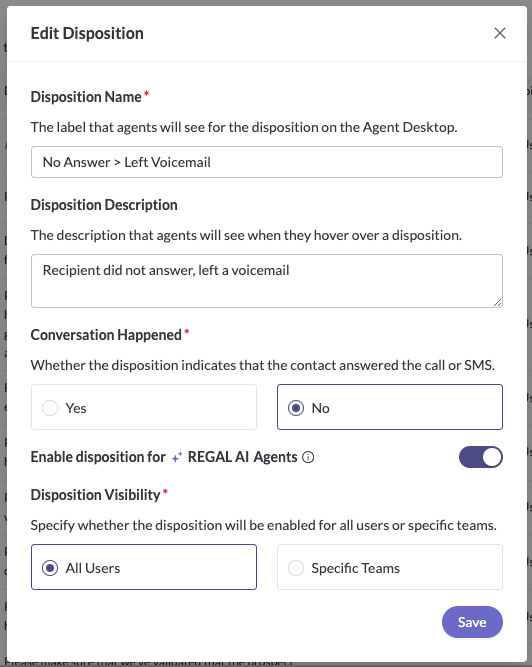
Disposition Table vs Global Settings
The disposition table shows only your AI Dispositions. System Dispositions always run first and cannot be removed or overridden by those in the table.
Selecting a Model for AI Dispositions
Regal uses OpenAI's gpt-4o-mini to disposition AI Agent calls by default. If you find that you aren't getting the results you'd like from dispositions — for example, if your calls or disposition descriptions are long and the LLM isn't doing a great job at assigning dispositions — you might want to change the model used.
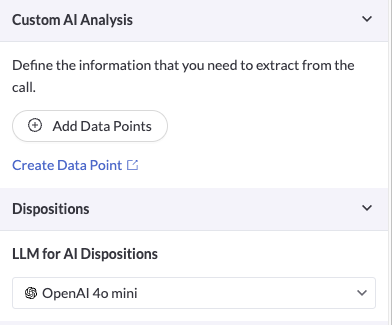
You're able to change the model under the "Dispositions" section of the AI Agent Builder. Generally, if you're looking for more accurate disposition results, you should try a larger model (like gpt-4o, gpt-4.1, or gpt-5) instead of a smaller/mini variant (like gpt-4.1-mini or gpt-5-mini).
Best Practices
- Ensure mutual exclusivity
Define AI Dispositions so that each call scenario fits exactly one option. Clear, non-overlapping descriptions reduce ambiguity. - Minimize the number of AI Dispositions
A smaller set of well-defined options improves accuracy. The AI is more likely to select the correct outcome when it has fewer choices.
Updated 11 days ago