

Concurrency
Set your AI agent concurrency
Every AI agent can concurrently handle a max of 50 calls at once. Your order form will define the number of concurrent calls that are included in your Plan for free. Additional concurrency can be purchased.
Limit your AI Agent concurrency
Need to cap the concurrency of your AI Agent? This is especially important when your AI Agent transfers calls to a human team with limited capacity. For example, imagine an outbound SDR AI Agent that qualifies insurance prospects before handing them off to licensed agents to close the sale:
- Your AI Agent is handling 50 calls concurrently
- Average AI call duration is 5 minutes
- 40% of calls transfer to a human
- Licensed agents spend 30 minutes on average closing each transferred lead
In this scenario, you would need approximately 120 licensed agents to support the transfer volume generated by the AI Agent: (30/5)×50×0.40=120
If you don't have 120 agents ready to take transfer, limiting AI Agent concurrency helps ensure your downstream human teams aren’t overwhelmed and prevents long hold times or dropped handoffs.
Transfer-Aware Dialing: If your human agent teams who are receiving transfers are in Regal or Five9, you can also dynamically adjust your AI Agent's outbound dialing volume/pattern to match your exact staffing (since it can fluctuate intra and inter day), without having to manually adjust your AI Agent's concurrency. See Transfer-Aware Dialing docs.
Increase your AI Agent concurrency
For high volume use cases where SLAs really matter and you require your AI agent to do more than 50 concurrent calls at once for a given use case, you can dupe your AI Agent to create multiple AI agents to handle the same calls, and use a queue or team to round robin the calls among those agents.
Set your concurrency by Agent
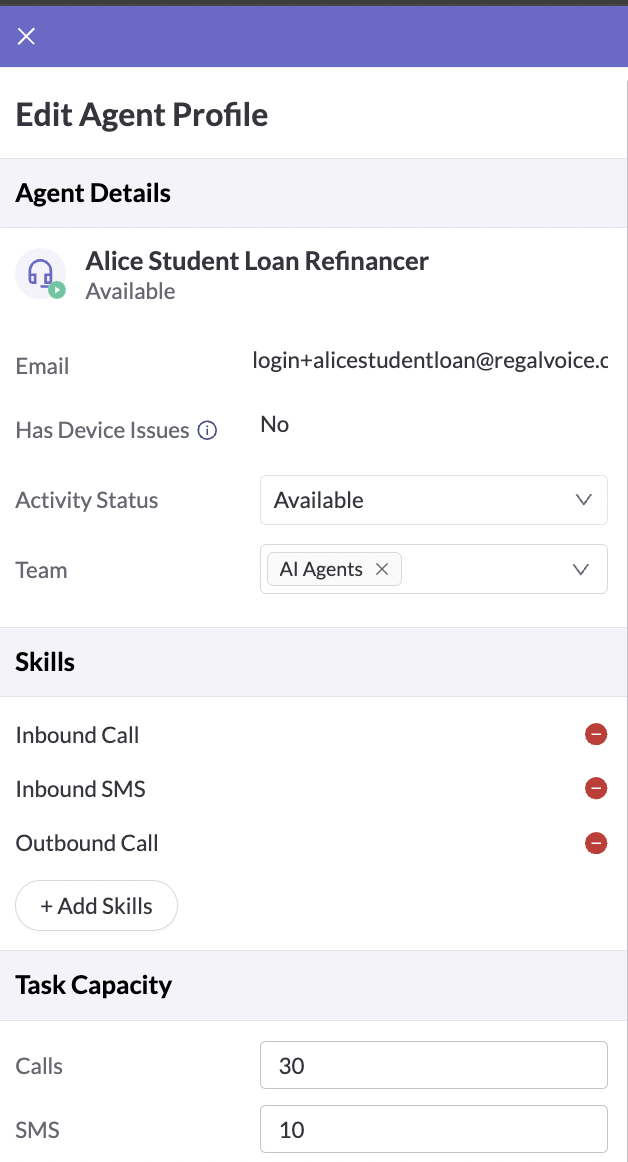
You can set your concurrency by channel by clicking on your AI agent from the Agents page, adjusting the "Task Capacity" to the number of concurrent calls or SMS your agent should handle and saving:
Updated 5 months ago