

Voice Settings
Tune your AI Agent voice
Regal gives you a lot of ways to tune your AI Agent voice.
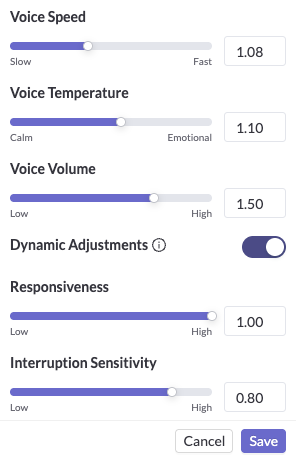
List of Voice Settings
Speed
- Description: Controls how fast the agent speaks.
- Range: 0 to 2.0
- Default: 1.0
- Recommended:
- ~1.1 for most customer segments - slightly increasing speed often sounds more natural and helps maintain momentum on calls.
- However if your customer demographic is older e.g., 50+ it's better to leave the speed at 1.0
Temperature
- Description: Adjusts the variation in tone and emotion. Higher values sound more expressive, while lower values are more consistent.
- Range: 0 to 2.0
- Default: 1.0
- Recommended:
- Most product use cases value predictability in the exact tone, inflection, pronunciation of verbatim statements or phrases, then target ~0.60 or 0.70
- However, if you want more open ended conversations, you can try ~1.15 - adds just enough variation to sound human without sacrificing clarity.
Volume
- Description: Controls how loud the agent’s voice is.
- Range: 0 to 2.0
- Default: 1.0
- Recommended: 1.0 - Most voices sound best at the default level. Only adjust if you notice the agent is unusually quiet or loud.
Dynamic Adjustments
- Description: Your agent can automatically adjust its speaking speed and volume during a call.
- When a contact says something like "can you speak faster?" or "speak up a bit," the agent updates on the fly — no prompt configuration required.
- You'll see these adjustments logged as actions in the test UI and call transcripts.
Responsiveness
- Description: Determines how quickly the agent starts speaking after hearing the contact.
- Range: 0 to 1.0
- Default: 1.0
- Recommended:
- 1.0 for most use cases - provides a natural pause before speaking. Reducing this will add intentional latency to each response of the AI agent.
- For older demographics who are a bit slower to speak or make drag out responses or be chatty, start at 0.90 - 0.95 to avoid the AI agent speaking over the customer. You may need to dial it down even more.
Interruption Sensitivity
- Description: Controls how easily the agent detects and responds to interruptions from the contact.
- Range: 0 to 1.0
- Default: 0.7
- Recommended:
- 0.7 - This setting strikes a balance between ignoring background noise and picking up genuine interruptions.
- Note: if your use case is for users in the field e.g., technicians and there is consistently background noise on the calls, you can test lowering this setting.
To detect voice activity, these features rely on Silero VAD by Silero Team, licensed under the MIT License. See https://github.com/snakers4/silero-vad."
Updated about 2 months ago
Did this page help you?