

Drafts & Versioning
Use Draft and Active versions to safely make changes to an AI Agent without disrupting live calls.
Overview
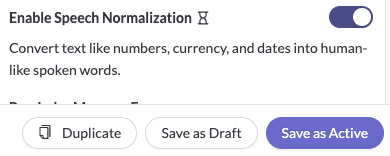
Every time you save an AI Agent, Regal creates a new version.
Each version has one of two statuses:
- Draft: Used for testing, simulations, and review only. Draft versions are never used on live calls.
- Active: Used on live calls. The most recent Active version is always the version customers interact with in production.
This allows you to iterate on an agent, validate changes, and only push updates live when you're ready.
Draft vs. Active
Draft
Save a version as Draft when you want to:
- test changes without affecting production
- collaborate on edits before going live
- continue iterating on an agent over multiple saves
- restore an older version and review it before re-activating it
Draft versions can be used in the Test UI and in simulations, but they are never used on live customer calls.
Active
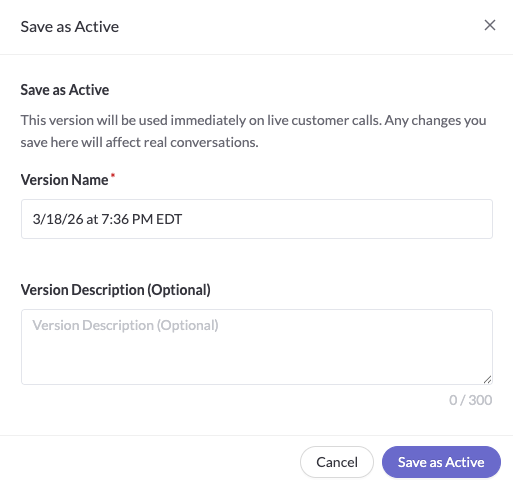
Save a version as Active when you want your changes to go live.
The latest Active version is always the version used in production. As soon as a new version is saved as Active, it becomes the live version for customer calls.
How Saving Works
Every save creates a new version of the agent.
That means:
- saving changes as Draft creates a new Draft version
- saving changes as Active creates a new Active version
- restoring an older version also creates a new version
You are never editing an old version in place. Instead, Regal always creates a new version based on the state of the agent at the time you save.
Testing Behavior vs. Production Behavior
Regal uses different versions of the agent depending on where the agent is running.
In Testing
The latest saved version is always used by default in:
- the Test UI
- simulations
This is true whether that latest version is Draft or Active.
In Production
The latest Active version is always used on live calls.
This means you can continue saving Draft changes for testing while keeping your current Active version live in production.
Recommended Workflow
A common workflow looks like this:
- Open your existing agent.
- Make your changes.
- Save the agent as Draft.
- Test the latest version in the Test UI or simulations.
- Continue making changes and saving new Draft versions until you're satisfied.
- Save the agent as Active when you're ready for the new version to go live.
This allows you to iterate safely without creating duplicate agents or manually copying changes back into production.
Restoring an Older Version
When you restore an older version of an agent, Regal restores it as a Draft.
This gives you a chance to review and test that restored version before using it in production. If you want that restored version to go live, save it again as Active.
Version History
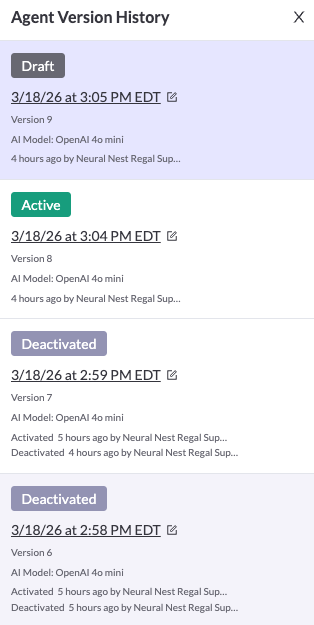
In version history, you can see:
- whether each version is Draft or Active
- which version is currently Active
- when a version became Active
- when an Active version stopped being used in production
This makes it easier to understand what changed, what was tested, and what is currently live.
Multi-State Agents
Multi-State agents can be saved as Draft even if not all nodes are connected.
When you test a Draft version with unconnected nodes, Regal automatically removes transitions that lead nowhere for the test run. This makes it easier to validate partial changes without fully wiring the entire graph first.
Best Practices
- Save as Draft while you're still iterating.
- Save as Active only when you're ready for the version to be used on live calls.
- Use Draft after restoring an older version so you can confirm behavior before re-activating it.
- Rely on version history to track what was tested and what is currently live.
FAQ
Which version opens when I click into an agent?
Regal always opens the latest saved version of the agent, whether it is Draft or Active.
Which version is used in the Test UI?
The Test UI always uses the latest saved version.
Which version is used on live calls?
Live calls always use the latest Active version.
Can I save the first version of an agent as Draft?
No. The first version of an agent must be saved as Active. The agent will not be available for calls until you move them to an Available status, though.
Does restoring a version make it live immediately?
No. Restoring creates a new Draft version. To make it live, save that restored version as Active.
Updated about 2 months ago