

Application Connect (Twilio Cross-Account Transfers)
Send live calls into Regal from your own Twilio account and ride routing data on the call, without SIP or per-agent phone numbers.
In this guide, we'll show you how to send live calls into Regal directly from your own Twilio account using Twilio's Application Connect feature (<Dial><Application>), and how to attach custom contact data to those calls so Regal can route them and personalize the conversation.
<Dial><Application>), and how to attach custom contact data to those calls so Regal can route them and personalize the conversation.This is for customers who run their own Twilio account (for example, a Flex contact center) and want to hand a live call off to a Regal AI agent, or originate calls from their Twilio numbers that a Regal AI Agent handles.
Getting your Application SIDTo use Application Connect, reach out to your Regal FDE or CSM. They'll give you a Twilio Application SID (it looks like
APxxxxxxxxxxxxxxxxxxxxxxxxxxxxxxxx) to dial.That SID is all you need from Regal to get started.
Why use Application Connect?
If you are currently on Twilio, Application Connect is usually the optimal way to move a live call to us.
- It works across separate Twilio accounts. Twilio does not support SIP transfers between accounts that aren't owned by the same parent organization. Application Connect is purpose-built for exactly this cross-account hand-off.
- No per-agent or per-use-case phone numbers. Unlike a PSTN transfer (
<Dial>+1AGENTNUMBER</Dial>), you don't need to provision and maintain a Regal phone number for every routing path. One Application SID handles all of them. This keeps your telephony costs down and avoids buying and branding duplicate numbers. - Routing data rides on the call itself. You can attach custom parameters to the call (lead source, priority, agent, opportunity ID, which team should handle it, customer intent, product type, etc.). Regal turns those into task attributes you can route on and reference in your AI agent, with no separate pre-call API request to race against the call.
Application Connect plays the same role for Twilio-to-Twilio customers that SIP plays for everyone else, it's just the cross-account-native way to do it on Twilio.
More on Twilio's sideFor the underlying Twilio behavior, see Twilio's docs on
<Dial><Application>and custom parameters.
Key Use Cases
| Use Case | Why It's Powerful |
|---|---|
| Transfer a care call to your inbound troubleshooting agent when the customer needs help connecting their device | Save your human agent time and get your customer connected to a smart, personable AI agent with instant access to powerful knowledge to diagnose and efficiently support the customer without long hold times. |
| Trigger an outbound intake call to a lead in Twilio and connect your AI Agent with all of the lead information | Enable a smooth and seamless conversation by equipping your AI agent with complete lead context from the start, eliminating the need for repetitive information gathering. |
| Quickly connect inbound calls to your inbound triage AI agents to replace rigid IVRs | Replace frustrating menus with personalized experiences that intelligently route customers and adapt to their needs in real time. |
How to configure and dial
In your own Twilio application flow, dial Regal's Application SID with <Dial><Application>. Pass any data you want Regal to receive as <Parameter> elements:
<Response>
  <Dial>
    <Application copyParentTo="true">
      <ApplicationSid>APxxxxxxxxxxxxxxxxxxxxxxxxxxxxxxxx</ApplicationSid>

      <!-- Reserved parameters (used for call identity) -->
      <Parameter name="ContactPhone" value="[the customer's phone number]"/>
      <Parameter name="RegalVoicePhone" value="[found in your active phone numbers]"/>

      <!-- Your custom parameters (added to the task as applicationConnectParams.*) for e.g. -->
      <Parameter name="Priorty" value="high"/>
      <Parameter name="AgentTeam" value="Appointment Pre-Screen"/>
      <Parameter name="LeadId" value="123456789x00"/>
    </Application>
  </Dial>
</Response>
Contact ResolutionAll dials must include a valid
ContactPhoneparameter, which will either map to an existing user profile, or create one.
A few notes:
- Replace the
ApplicationSidwith the one your FDE/CSM gave you. - We recommend setting
copyParentTo="true"so the original call leg'sTois preserved. - You can include as many custom
<Parameter>elements as you need.
Reserved parameters
Two parameter names are reserved. Regal uses them to identify the call and does not add them to your task attributes:
| Parameter | What it does |
|---|---|
Param_ContactPhone (sent as <Parameter name="ContactPhone" .../>) | The customer's phone number. Regal uses this to resolve the contact and as the call's identity. Required. |
Param_RegalVoicePhone (sent as <Parameter name="RegalVoicePhone" .../>) | The Regal-side phone number the task should be associated with. Optional, see below. |
RegalVoicePhoneis optionalIf you don't send
RegalVoicePhone(or send one that's invalid), Regal automatically falls back to your default number, so the call still connects.Sending a valid one is recommended for cleaner reporting and attribution.
Custom parameters
Every additional parameter is added to the task under applicationConnectParams, with the name preserved exactly as you sent it. For the example above:
{
  "applicationConnectParams": {
    "LeadSource": "Direct",
    "FirstName": "Jane",
    "LastName": "Nicholson",
    "SubscriptionType": "Master"
  }
}
Routing on your parameters
Application Connect calls skip the IVRApplication Connect calls go straight into your Regal queues so they reach an agent as fast as possible, they do not run through an IVR.
That means your routing rules must be configured ahead of time.Routing rules are only evaluated when the task is created; they do not apply retroactively to tasks that already exist.
You reference your parameters differently depending on whether you're writing a task expression or a worker expression.
Task expressions reference the attribute directly:
applicationConnectParams.priority == "high"applicationConnectParams.agent_team CONTAINS "setup"If you sent a valid RegalVoicePhone, you can also route on the standard task attribute:
regalVoicePhone == "+18005551212"Worker expressions reference the task with the task. prefix (to distinguish it from worker.). This lets a single Application Connect rule route dynamically, for example matching the worker's team to the team you sent on the call:
worker.teams HAS task.applicationConnectParams.AgentTeam
Routing RulesRouting rules are evaluated from top to bottom. The first rule that matches your task will route it. The syntax is particular, you can refer to this Routing Rule Syntax Guide for the full breakdown.
Using parameters downstream
Once a parameter lands on the task, it flows through the rest of Regal alongside your other call data. Your custom parameters are available in Task-related events sent to your downstream destinations, integrations and data warehouses, common events include:
- Transcription & Recording
- Task Creation & Completion
Referencing parameters in your AI agent
Your Regal AI agent can also read these parameters during the call using dynamic variables. In your agent prompt, reference them with task.applicationConnectParams, for example:
"Hi there! This is Elsa from Circle Bank, am I speaking with {{task.applicationConnectParams.FirstName}}?"Configure Outbound via External Transfer Phonebook
You can map the same Application Connect attributes dynamically in the external transfer phonebook when transferring out of Regal to another Twilio Account Application:
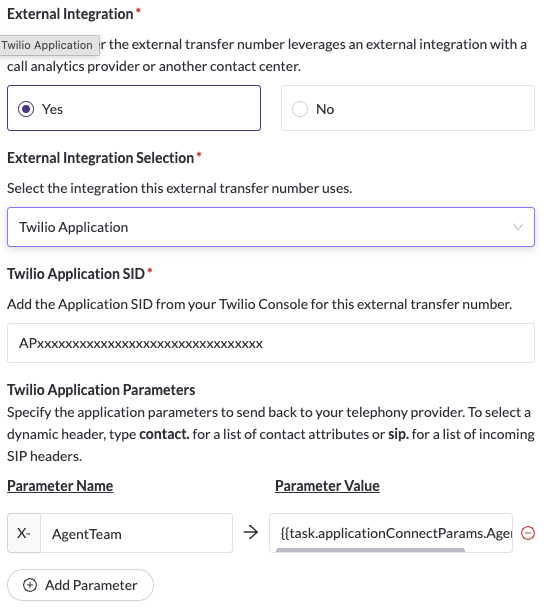
Add your own Application SID with dynamic attributes from the contact or the task
FAQ
How do I get my Application SID?
Reach out to your Regal FDE or CSM. They'll provision it and share the AP... SID with you. That's the only thing you need from Regal to start dialing.
Where can I view the parameters I sent to Regal?
Go to the Tasks page, find your call task, and click into it. Your parameters appear in the applicationConnectParams object in the Task Attributes section – you can expand the object to view each one. They can also be viewed in the event history on any Regal Event associated with the call.
What happens if I send an invalid or unknown RegalVoicePhone?
The call still connects. Regal falls back to your default number. Sending a valid RegalVoicePhone is optional but recommended for cleaner reporting and attribution.
Is the casing of my parameter names preserved?
Yes. If you send OpportunityId, it stays OpportunityId. Only the Param_ prefix Twilio adds is stripped.
Updated 5 months ago