

Run Function
Let your AI Agent call a function during a conversation.
Overview
The Run Function action lets your AI Agent call a function mid-conversation. The agent passes in the values the function needs, the function runs in Regal, and the agent gets the result back to use in the call.
Use it to validate what a caller says, look up a record, format a date, or apply a business rule, while keeping the logic in code instead of in the prompt.
Prerequisites
- An active function. Drafts don't run on live calls.
- An AI Agent you can edit.
Add the Action to Your Agent
You can add the action yourself or ask Copilot to attach a function to your agent.
-
Open your AI Agent and go to its actions.
-
Add a custom action and choose Function as the type.
-
Select your function. Its inputs appear for mapping.
-
Map each input (see below).
-
Save the action.
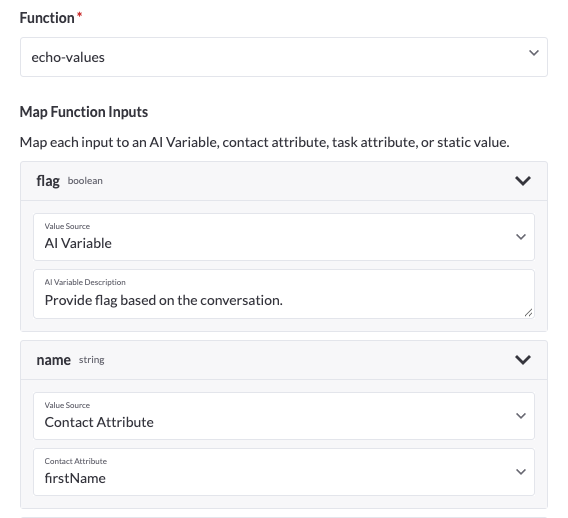
Map Your Inputs
Each input on the function needs a source. Choose one per input:
| Source | Use it when |
|---|---|
| AI Variable | The agent should collect the value during the conversation, like an email address the caller reads out |
| Contact Attribute | The value already lives on the contact's profile |
| Task Attribute | The value comes from the task that started the call |
| Static Value | The value is the same on every call |
Use the Output
After the function runs, its output fields are available to your agent for the rest of the conversation. Use them in your prompt to decide what to say or do next.
Update Your Agent Prompt
Tell your agent when to call the function and what to do with the result. For example:
When the caller gives you an email address, call Validate Email. If validated_email
is empty, ask the caller to repeat it. Otherwise, continue with the validated address.
Test Your Setup
- Run a test call with your agent and trigger the situation that should call the function.
- Confirm the agent calls it and uses the output as expected.
- If something looks off, open the function and run it from the Test function drawer with the same inputs.
Calls always use the latest active version of the function. If you change the function, the next call uses the change.
Troubleshooting & FAQ
My agent isn't calling the function.
Check that your prompt says when to call it, and that the action is saved on the agent.
The function isn't available to select.
Make sure it's activated. Drafts don't appear as live options.
The agent passes the wrong value.
Check the input mapping and the input's description on the function. Add detail to the description if the agent is guessing.
My function returns an error.
Run it from the Test function drawer with the same inputs to see the output or error.
Updated about 1 hour ago